

InterACTIVE Summer Learning
For those of you who have been following us for some time now, and if you’re new you’ll now find out, we are not only educators but parents of two young boys. We acknowledge that a few skills may have been lost or at least lessened during remote learning, so this summer we wanted to take an interACTIVE approach to keeping the learning alive.

For those of you who have been following us for some time now, and if you’re new you’ll now find out, we are not only educators but parents of two young boys. I don’t know about your students or personal children at home, but as for ours, the ending to this school year left them with a bitter taste in their mouths for this thing we call “learning.” As educators, this is so disheartening and frustrating, but at the same time can we really blame them? I would guess that many other children are feeling the same way as ours—burnt out, tired, apathetic, frustrated, bitter—the list could do on and on. We acknowledge that a few skills may have been lost or at least lessened during remote learning, so this summer we wanted to take an interACTIVE approach to keeping the learning alive.
What Does InterACTIVE Learning Look Like in the Summer?
As far as we are concerned, learning can be found in anything-from playing with friends in the puddles left by the afternoon rain, to hunting for tadpoles in the ditch, or by hiking hidden forest trails. We as parents believe though that there are times that if we don’t consciously make an effort to expose these moments are children will easily get lost in their choices of video games, TV shows and YouTube channels. Not that these things are bad, but we make an effort to keep our children the active participants in our day rather than passive participants.
When balancing our day, we often give the kids choice is our daily schedule and what types of things we are going to do. Regardless of the activity though, we try to keep a few principles in the forefront as we plan.
Inquiry: Many times in school students are just given information to process, memorize or curate with little time given for true investigation and inquiry. We like to find the things that interest our kids, just like we would our students, and then build in small ways they can investigate these things further.
Play: There is so much learning that comes through play. Just pure, unregulated, creative play. So much of our normal day is regulated and we work hard and encourage activities that revolve around play.
Collaboration: Collaborating with others is closely related to play, but really the idea here is finding activities and opportunities where our kids have to work together to be successful. It’s important to keep skills like listening, revising sharp, so when our kids do go back into the classroom they will be able to coexist with their classmates again.
Reflection: Being able to reflect and remember an experience is important to us. Sometimes there is learning to be found even after a fun activity or event though a simple, thoughtful conversation.
How to Create InterACTIVE Learning Activities
Choose your priorities: Do you want to be outside more? Maybe you want to try and reconnect with friend and family after this period of solitary. Perhaps you want to keep your kids actively reading or writing or working on other specific skills. Decide on what your priorities are and then create experiences that your children will inevitably get to do those things through.
Set aside time to be present: We can relate to this more than ever now that we have been working from home, but we try to be purposefully present with our kids during these learning moments and activities. It is true what they say about the quality of the time spent over the quantity of time given. We often find that at first our children may resist or be uninterested in a specific task or activity, but once they see us involved they quickly become committed to the task. This is the foundation of interACTIVE relationships—they are two way and reciprocal.
Tip: If you find it hard to separate your work time or are having trouble getting in a productive time for you, try building a time in to work when your kids are doing something less involved. For example, when our children get their time for video games or screens, we used this as a time to sit and read emails, work on presentations or take some quality time to read a book!
Keep it fresh: Our kids love going to the beach, but if we went every other day they would quickly lose the excitement of going and be less engaged with the adventures we had there. So we go often, sometimes changing the spot we visit, the time of day we go out, or who we go with. We try to rotate our favorite activities like swimming or bike riding and sprinkle in the newer and more unknown adventures in between.
InterACTIVE Summer Learning Ideas
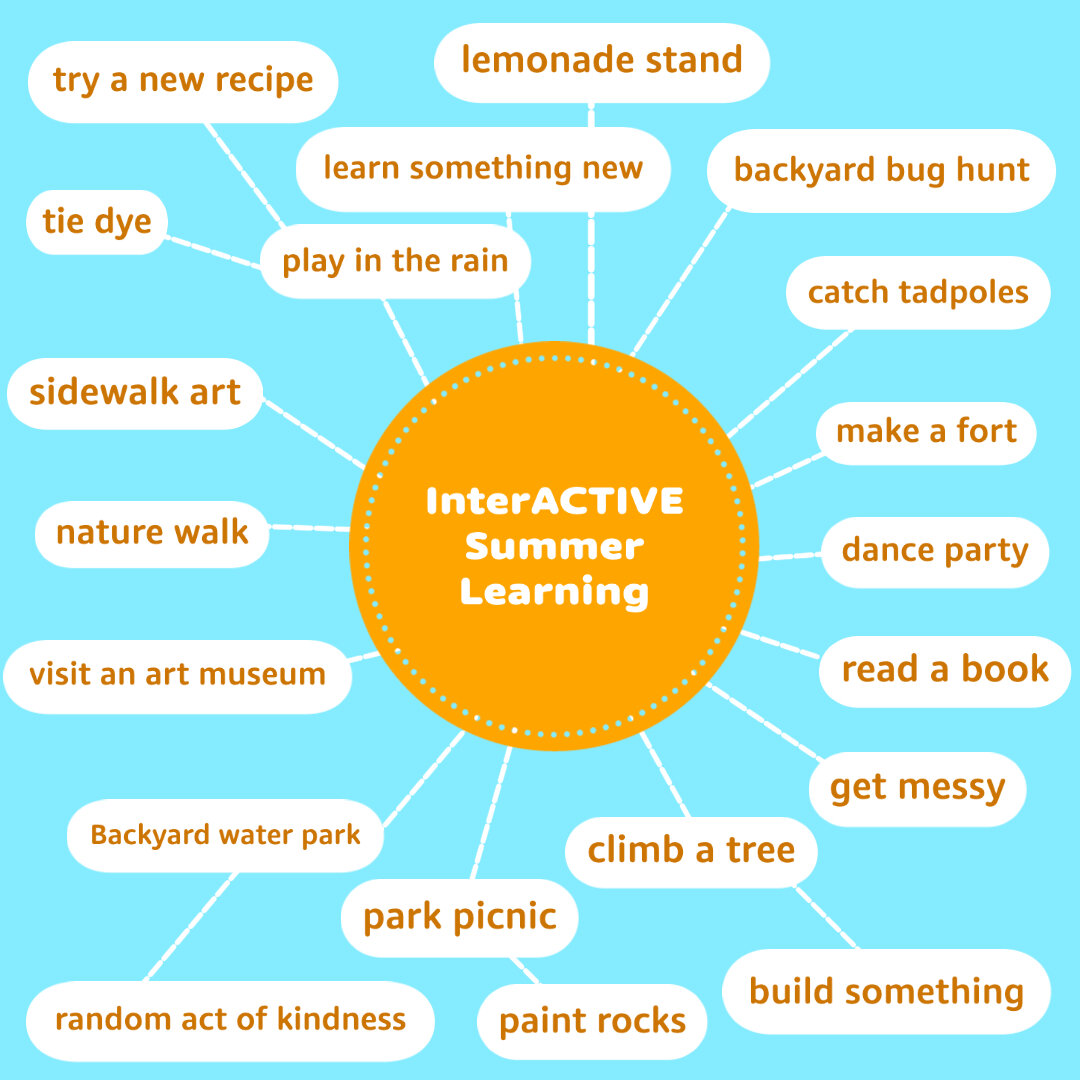
Being teachers may help us a bit as we plan for our summer, but we also love learning from the unplanned, organic moments we spend with our kids. We did include though a few of the things we have done so far with our own kids that have been engaging and definitely educational. We also included some ideas that we hope to get to this summer as well.
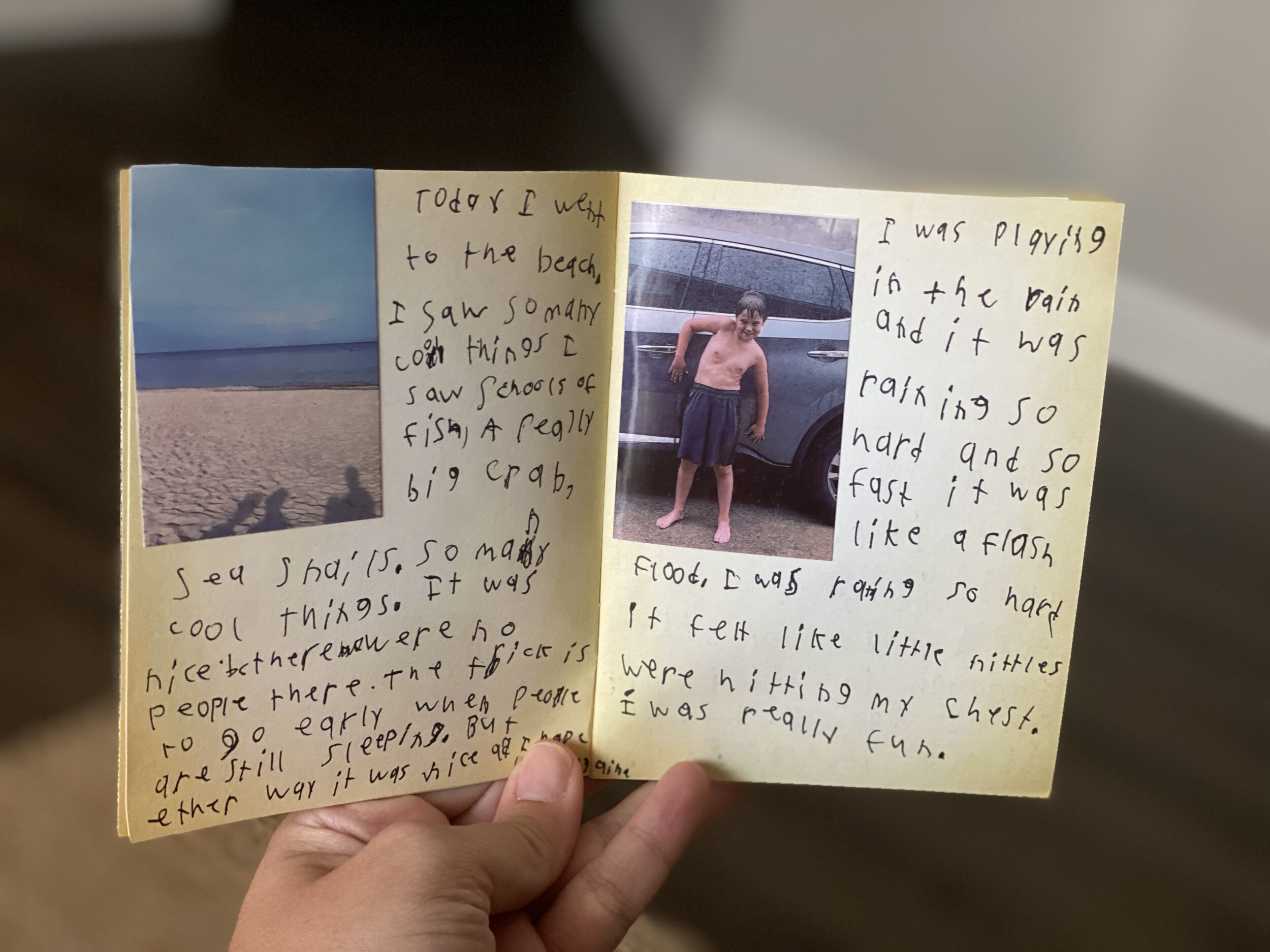
Another thing we have started this summer with our own kids are summer “adventure” journals. The original idea came from a local blogger named Kelli Hampton and essentially we keep track of all the small things we do and journal our memories. You could, as Kelli suggests, make the journal ahead of time as almost a bucket list of sorts, with challenges and things for you kids to do, but we keep ours more organic. Our pages stay blank and we just record whatever memories we wish to. Before summer started we purchased a pack of small, blank passports and are using one of Mrs. Merrill’s favorite classroom tools—her sprocket printer. A sprocket is a small, wireless, photo printer that allows you to print small, Polaroid-like photos straight from your phone. (And as of the day I wrote this blog, the printer linked here was $40 off which is the cheapest I’ve seen it!)


In today’s time we take the majority of photos on our phones and this printer allows the kids to print the photos we took documenting our activity or trip, peel off the sticky backing and plop the photos down in their adventure journals. They then write whatever they like to in regards to what we did, and this allows mom and dad to give a bit of writing review as we go. You could totally make these journals digitally too! We would recommend programs like Book Creator or Buncee for something like this.


What’s great is that the kids usually take the lead and will often ask us to take a photo so they will have it to write about in their adventure journals. They are taking the ownership of it which is always what you want when it comes to learning. The packet of books came with multiples, so if they fill up one book they can start another. Maybe even using one as a place for some narrative writing too! (A mom can hope, right?)
The beauty of interACTIVE learning is that it can happen anywhere! It doesn’t always have to use technology or be in a classroom full of students. Here’s to having a summer filled with memories and learning!
Stay interACTIVE!
~👗➕👓
For more information on how you can make learning in the classroom more #interACTIVE, check out our book The InterACTIVE Class!



@TheMerrillsEDU Summer Tour!
We had big summer plans…then things changed…Now, you can catch us “virtually” this summer at any of the INCREDIBLE events below! This summer doesn’t have to be a bummer!
We had big summer plans…then things changed…Now, you can catch us “virtually” this summer at any of the INCREDIBLE events below!

Wakelet Live!
First up for us this summer is Wakelet Live! Please join us on Wednesday, June 3rd at 11am EST as we discuss “How to Use Wakelet in the Classroom.” The presentation is free, but requires registration. Seats are filling up fast, so don’t wait!
The InterACTIVE Class Book Study!
You asked, and we listened! We’re starting an InterACTIVE Class book study! The party starts June 11th and wraps up on July 16th. As a group, we’ll share tips, tricks, and different ways to use apps. Join in on the fun by purchasing your copy of the book, then joining our Book Study Facebook Group!
Purchase the book by ⚡clicking here⚡
Join the Book Study by ⚡clicking here⚡


Great Plains Summit
Join us on July 16th & 17th for the Great Plains Summit! You’ll learn from topics such as Google, AR, and a presentation on Flipgrid, followed by a workshop from us! Many more details to come soon, but for now you can find info by visiting the Great Plains Summit website.
Indiana Connected Educators Conference
Our next stop is from July 20th - July 24th for the Indiana Connected Educators (virtual) Conference. This MASSIVE event is FREE and features 80+ Ed Tech Leaders. More information regarding our session and time TBA soon!


Teach With Tech Conference
Our last stop for the summer is the Teach With Tech Conference which kicks off July 27th! This virtual conference features 70+ sessions, and early bird tickets are available for $19.99.
Purchase our book, “The InterACTIVE Class!”


Remote Learning 101: Presented by The InterACTIVE Class
As more and more schools look towards the possibility of Remote Learning, we understand that you probably have lots of questions. We’re here for you.
As more and more schools look towards the possibility of Remote Learning, we understand that you probably have lots of questions. We’re here for you.
What is remote learning?
Remote Learning occurs when the learner and instructor, or source of information, are separated by time and distance and therefore cannot meet in a traditional classroom setting. This is also being referred to as “distant learning.”
I don’t know much about educational technology. How will I learn fast enough to teach remotely?
Remote learning will undoubtedly push many teachers into the realm of digital teaching and learning faster than they may have on their own. If you are one of those teachers who hasn’t used classroom specific applications, we would recommend starting with our book The InterACTIVE Class. It was not written specifically for remote learning, but it couldn’t be out at a more relevant time.

In it you you find two page explanations for applications like Flipgrid, Seesaw, Book Creator, Buncee and many more, followed by pages of lesson ideas that you can take and immediately implement into your remote learning environments. In addition to the book, you can join our InterACTIVE Class Community on Facebook where educators from around the world share and help each other in regards to integrating technology in meaningful and relevant ways.
Where do I start?
If you are tasked with teaching remotely, our advice is to keep it simple and routine. Do not use the event of remote learning to try something new or to introduce a new platform. That is stressful enough when in the classroom with your students. Deliver content through platforms or programs that your students have already used, and if you have not used much (or any) technology before, choose 1 platform and walk your parents and students through it as you go. This is where the importance of being routine comes in. If you have the opportunity or choice to decide how to deliver content and monitor learning while teaching remotely, do it using the same program(s) while out of the classroom. Also, if you can structure the format of how you deliver content it will help parents and students navigate the unknown world of remote learning. We suggest explaining content through teacher direct lessons or online material, giving the students time to explore and create baed on their new learning, and possible assess after if necessary. If you can do this in the same way through the same program(s) repeatedly it will help students and families efficiently get acclimated with remote learning.
Not all of my students have internet access. How can I reach them during this challenging time?
One way to help students with limited internet access is to think about how you are delivering content while out of the classroom. Is there a way you can front-load assignments—maybe give the week’s worth of assignments out at one time rather than going day by day. That way, students with limited access can see more at one time if their access is limited. Also, possibly reach out and look into how local community centers, libraries and other community outreach places could help families with limited access to resources. Finally, try to use applications that are smart phone friendly in addition to being web-based. This way, in the case that a student doesn’t have a computer at home or internet, they could still possibly access information through a parent’s smart phone.
Comcast has recently announced that new customers are able to receive 60 days of complimentary Internet Essentials service, which is normally available to all qualified low-income households for $9.95/month. They are also increasing Internet speeds for the Internet Essentials service from 15/2 Mbps to 25/3 Mbps for all new and existing customers, which will be the speed of the service going forward. For more information on this, please visit the website below and feel free to share with families and colleagues.

Comcast Internet Access
Click the button below to learn more about Comcast’s internet access.
Where do I get started as I prepare for remote learning?
When getting started, it is important to settle on the platform or programs you are going to utilize while out of the classroom. As mentioned before, we highly recommend choosing ones you have already used this year, but if you have not used much or are unsure if the programs you have used will work best, here are some tools we suggest considering for creating “learning hubs”, keeping students engage, allowing real-time collaboration and much more!
How can I create a safe and cohesive learning environment for students while away from the classroom?

Seesaw
Seesaw is a platform for empowering students to demonstrate and share their learning. Students use powerful tools in the Seesaw app to create, reflect and demonstrate learning. When students share their learning in their Seesaw portfolio, teachers and families gain valuable insights into what their students know and can better support their development. Think of it as a digital portfolio.
Pros: Available anywhere, on any device.

Microsoft Teams
Microsoft Teams is your hub for teamwork in Office 365. All your team conversations, files, meetings, and apps live together in a single shared workspace, and you can take it with you on your favorite mobile device.
Pros: Available anywhere on any device (with a free Office 365 account - sign up here).
I want my students to maintain the collaboration that they would normally have within the walls of the classroom. Which tool should we use?
Educators can pose questions / tasks and generate collaboration by using Flipgrid. Flipgrid is a social learning / web-based platform where educators ask a question (called “topics” in Flipgrid), and then students respond to the question in the form of a video. Students can get creative and add external links, drawings, music, and more to their responses. The video responses appear in a grid style display, where other students can then view and respond to. This generates a web of discussion, similar to that of a video message board. With Flipgrid, your students will still be able to support one another and share their thinking. They will also be able to critique and respectfully generate positive discussions based on your topic.

Flipgrid
Flipgrid is simple. Educators spark discussions by posting Topics to a classroom, school, professional learning community, or public Grid. Students record, upload, view, react, and respond to each other through short videos. Flipgrid is video the way students use video ... social, engaging and fun!
Where can I access high quality, digital materials for my students to use while learning online?
Taking print material and converting it to digital platforms can be time consuming and overwhelming. There are many companies stepping up to provide teachers with high quality, interest provoking content while you are out learning remotely.

Newsela
Newsela is committed to bringing authentic, engaging, diverse and accessible content to all learners. They believe the best lessons start with the best content. All teachers can now access Newsela ELA, Newsela Social Studies, Newsela Science, and the SEL Collection for free for the rest of the year.

Scholastic News
Scholastic known for publishing, selling, and distributing books and educational materials for schools, teachers, parents, and children. Their classroom magazines are found in many classrooms. Scholastic is creating 15 lessons for various age groups of students ranging from Pre-K to high school filled with quality nonfiction articles similar to the ones found in their magazines. Check out the curated articles for grades 3-5 here!
Pebble Go
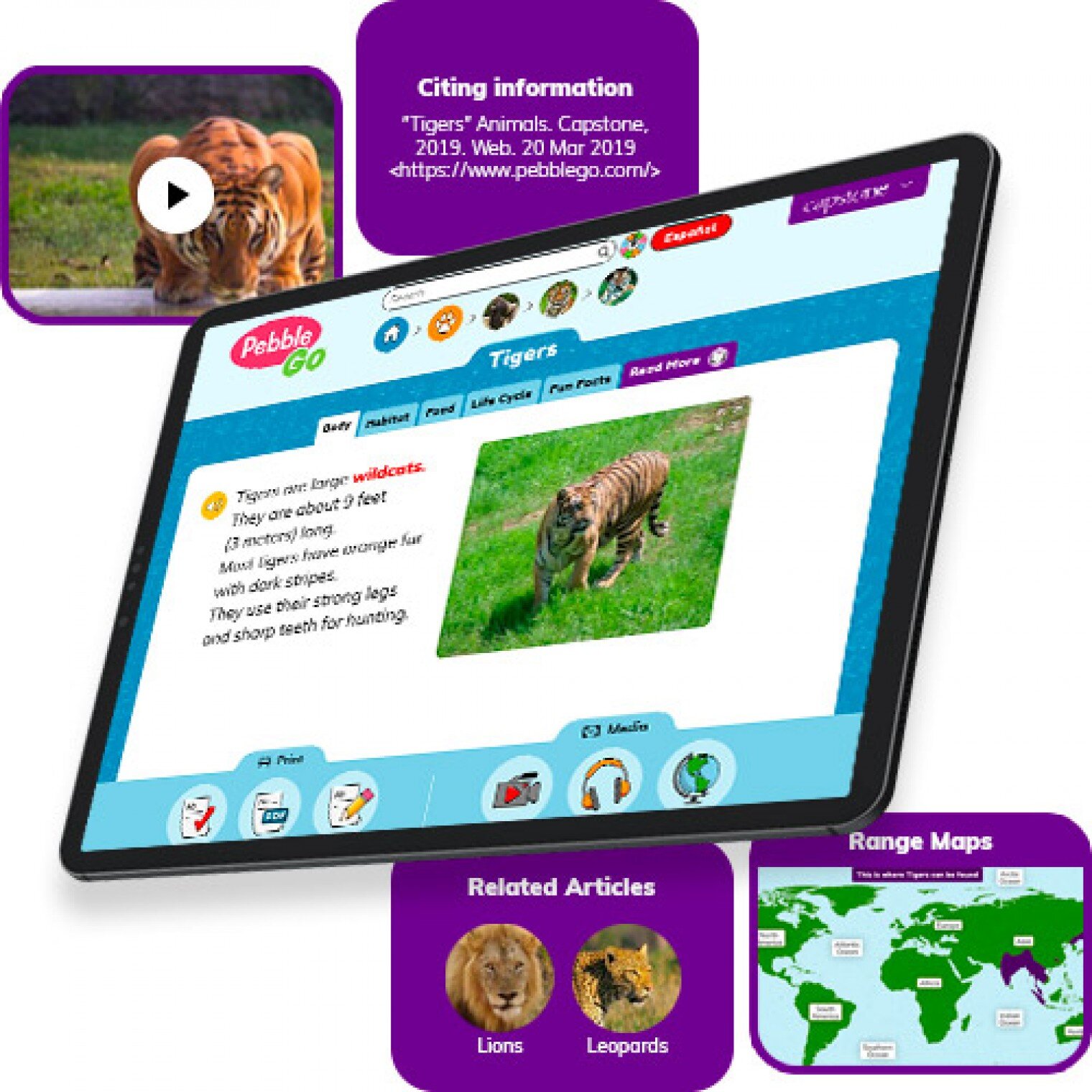
PebbleGo is a curricular content hub specifically designed for K-3 students. Packed with informational articles, ready-made activities, and literacy supports for students of all abilities, it boosts engagement and fosters independent learning in core subject areas. To learn how you can gain free access during school closures, click on the learn more button below.
Compatibility: Web based only
What tools can my students use to keep the creativity going?
Just because your students are away from the classroom, doesn’t mean that they have to lose their creativity. The list of apps below are highly recommended platforms that will have your students creating rich and authentic content that you can tie directly to your standards. If you have any questions on how to implement these, please don’t hesitate to reach out to us.

Buncee
With Buncee’s assortment of media options, creating a virtual lesson is quick and easy. Teachers can include text, video, audio, or even links to additional resources. Record your lesson using the video feature, or create an activity template for your student to complete at home. The classroom dashboard can then be utilized to share and track assignments. Teachers could also create a Buncee Board, so students can access materials, share their work, interact with their classmates, and participate in class discussions no matter where they are. Students can also create and submit Buncees back to their teachers. For more information, click the learn more button below.
Compatibility: all devices

Adobe Creative Cloud
Adobe has announced that they are giving their higher education and K-12 institutional customers globally — who currently make Creative Cloud apps available to students who login through on-campus labs — the ability to request temporary “at-home” access for their students and educators. This will be granted through May 31, 2020 at no additional cost. To learn more, click the learn more button below.
Compatibility: all devices

Minecraft: Education Edition
To help teachers and students stay connected to the classroom, Minecraft: Education Edition is now available through June 2020 for all educators and learners who have a valid Office 365 Education account. Click on the learn more button below for more information.

Book Creator
Book Creator is a simple tool for creating awesome digital books. You can create your own teaching resources or have your students take the reins. Combine text, images, audio and video to create stories, portfolios, journals, comic adventures, science journals and much more! Book Creator is offering everyone the ability to collaborate together on books in real-time. This is a premium feature that is usually only available with a paid subscription, but they’re offering 90 days free use of this tool, to help keep students and teachers connected.
How can I make learning engaging and interACTIVE during remote learning?
Distance learning doesn’t need to equal dull learning. There are many apps that not only allow students to learn alongside one another in real time, but they also help the teacher facilitate information in unique and different ways.

GimKit
GimKit is a live gameshow for the classroom. Students answer questions on their own device at their own pace. Throughout a Kit, each student will get exposure to the questions multiple times to ensure mastery.
Compatibility: all devices

Nearpod
What if we told you that you could have your students log onto your presentations, and literally switch slides to all devices logged on at the same time. With Nearpod, you can do just that. Students log onto your presentation with a code. Educators can also add slides for collaboration, drawing, 360 images, and more. Check out the learn more button below fore more information.
Compatibility: all devices

Hyperdocs
HyperDocs are free digital lessons that are easy to edit for your eLearning students. They are all about hyperlinking your docs for amazing learning experiences for kids! With one shortened link, students can access a lesson that contains instructions, links, tasks, and many clever ways to get thinking. Hyperdocs focus on creating opportunities for choice, exploration, and ways for kids to apply their knowledge. Explore these docs plus more by clicking the learn more button below.
Compatibility: all devices

Brain Pop
From the very beginning, BrainPOP was built on the belief that curiosity through short animated movies can make complicated ideas simple and clear. Today, BrainPOP’s rigorous learning experiences go far beyond a movie and quiz, offering a rich array of resources and tools that meet each student’s interests and needs while developing their critical, computational, and creative thinking skills across the curriculum.
For more information on how to make learning more engaging and relevant by using technology, check out our book The InterACTIVE Class.


Here is a Wakelet of other platforms that we are updating daily as we come across new resources and offers.
We are happy to connect and discuss which tool would work best for your particular remote learning experience. This is an unprecedented situation, and leaning on one another is more important now than ever before. Please don’t hesitate to reach out.
👓👗💚
#BetterTogether #interACTIVEclass #remotelearning
Persisting and Pivoting in the Classroom
Troubleshooting. It’s something we get asked about quite often. How do we deal with that one student that doesn't want to learn or work?

Troubleshooting. It’s something we get asked about quite often. How do we deal with that one student that doesn't want to learn or work? What is your backup plan when the lesson doesn't go the way you intended? Do you ever have days where the technology isn't cooperating or the wifi is down?
Educators are always surprised when we reply with "we probably do the same things you do!" because believe it or not, all of these things happen to us too! Teaching and learning is full of speed bumps that slow us down temporarily but how we react to the problems is what determines the rest of the journey. Part of the interACTIVE framework is troubleshooting. It is important to remember that being responsive must incorporate a time to reflect--looking back on the lesson and the learning, often reflecting on what didn't go just right and troubleshooting how to go about fixing it.
There is definitely a frustration that accompanies a hiccup in a lesson but too often as educators we forget that there is even learning happening during a lesson or activity gone wrong. Even when a student misses the mark there is learning present. When a program doesn't work the way we expected or a lesson takes twice as long as planned--there is still learning present. We often avoid hard or unknown things because we are scared of the challenge they may pose forgetting that through the struggle there will be learning present.
Troubleshooting is the last of 5 steps of our interACTIVE framework which we outline in our book. We also explain the necessity of learning how to PIVOT when teaching students in your own interACTIVE environment.
If you haven't already, jump on board and start transforming your teaching and the learning in your classroom and join our interACTIVE family as we troubleshoot and help one another along the way! Grab your own copy of The InterACTIVE Class here and read through the five framework steps. Always remember- #bettertogether!
-K 👗

Opening the Window to the Classroom
To better understand a parent's perspective of education, think of someone who wears glasses--maybe even yourself! Your glasses help you see, or maybe you're completely dependent on them to function effectively. What happens when you take your glasses off? You view the word entirely differently.
Excerpt from The InterACTIVE Class, Chapter 6

To better understand a parent's perspective of education, think of someone who wears glasses--maybe even yourself! Your glasses help you see, or maybe you're completely dependent on them to function effectively. What happens when you take your glasses off? You view the word entirely differently. You have a sense of where things are located but you can't see clearly. Everything is blurred. You might be able to tell where people are located in a room by their movement or the sound of their voices, but you can't recognize them.
This is how parents often view your classroom. They know the basics of the school--when to drop off or pick up, how to register to volunteer or chaperone a field trip, the way grading is done, and when report cards come out. Depending on how you communicate with them, they may even know what standards and content you will cover in class during the week. Even so, most parents feel out of place and uncomfortable at school and around the classroom. They haven't been students in a long time, and they may be unfamiliar with the acronyms and red tape of the current educational system. They want to help their children, but they don't know how and often just try to stay out of the way. As a result, they have limited knowledge of what you are teaching and how their children are learning despite your most valiant efforts to communicate with them.
Over the past few years, we have developed a solution for this. We call it "opening the window to the classroom." When our firstborn started kindergarten, we started to shift our teaching. For the first time, we realized what our classroom parents experienced. After we sent our son to school for an entire day, we anxiously awaited the bell at dismissal, excited to talk to him about all the learning he did. But each afternoon, he returned with an anticlimactic "fine" or "good." He loved the kids in his class, his teacher was nice, and his daily routine was pleasant, but we weren't able to experience any of this with him. We longed to talk to him about what he had learned and share in the joy he clearly felt while at school, but his ability to remember parts to share with us was--well...we'll just say it "need improvement."
We realized we were not the only parents who felt this way; many others also wished to support and encourage their children's learning. Teachers have an army of parents willing to work with their children at home to enrich and extend what is taught at school. But the army needs communication from you. How are you opening your classroom window to let parents see inside? In what ways do you communicate with parents so they can support you at home?
These questions are answered as we share some of our favorite ways to get parents interACTIVE and involved in The InterACTIVE Class!
Grab The InterACTIVE Class today!
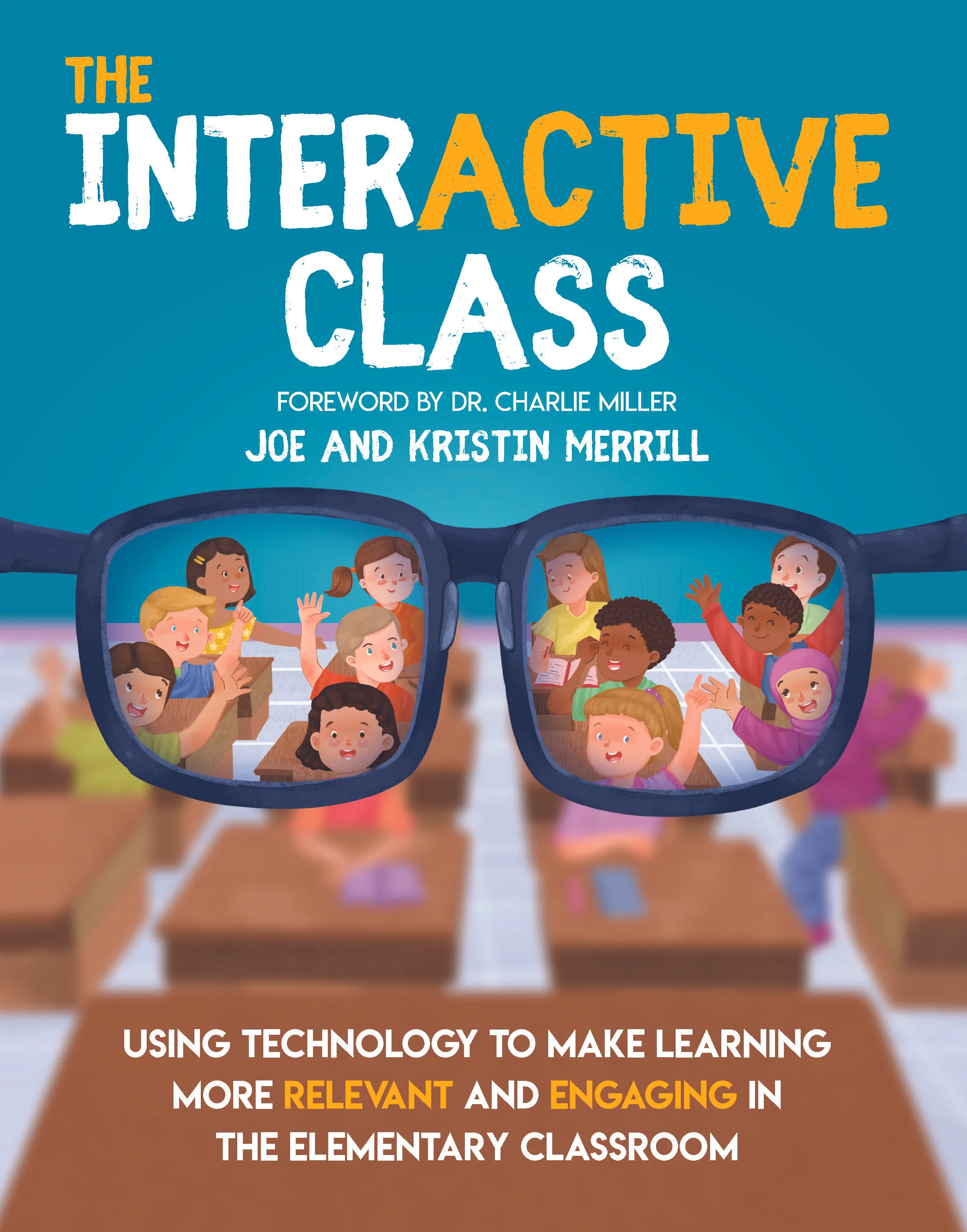
The InterACTIVE Class is now available for purchase and for a limited time we have some amazing gifts to give away with each and every purchase in the month of January! Send your receipt our way and we will send these limited resources to you!
Click here to share your purchase with us!
Order today and receive our special book bundle package!

Above was just a small excerpt from The InterACTIVE Class. We are so eager to share all that is written within these pages and we are excited to get the idea of #interACTIVE teaching and learning out into the world. Thank you for being part of our #interACTIVE family!

#interACTIVE Explanation
“The InterACTIVE Class” book is almost here! Learn more about what to expect!
After a year of hard work we are so excited to finally announce that The InterACTIVE Class will be out in January 2020! The book's release date is set for January 14th and preorders will be available soon.

What does it mean to be interACTIVE?
InterACTIVE teaching involves students by allowing them to become ACTIVE participants in their own learning while giving them both choice and voice with in the learning environment. InterACTIVE teachers shift their thinking from WHAT they teach to HOW they teach!

Why is interACTIVE teaching and learning important?
InterACTIVE learning excites and engages students thus giving them the drive to work through challenging tasks and assignments. Students today are growing up in an environment so much different than when we were growing up and thus need to learn in an environment adapted to their needs.

How can you become a more interACTIVE teacher?
Teachers can be interACTIVE not only in how they teach, but also in how they set up and run their classroom. Learn how to create an interACTIVE learning environment where students feel comfortable learning and taking chances. You will also read about how to create interACTIVE relationships with both students and parents.

We are so excited to share The InterACTIVE Class with you and we will be in touch VERY soon with news on pre orders. If you’d like to stay in the know with all things #interACTIVEclass simply head here! Thank you for being part of our #interACTIVE family!

Roll Your Way to More #interACTIVE Lessons
Creating an #interACTIVE learning environment is something that we strive to do as educators every day. But not every engaging activity has to be on a computer, involving song and dance or a costume change. Sometimes a simple die can go a long way!
Creating an #interACTIVE learning environment is something that we strive to do as educators every day. But not every engaging activity has to be on a computer, involving song and dance or a costume change. Sometimes a simple die can go a long way!
The first week of school is always a time where we spend time developing the culture of our classroom and focusing in our our school-wide initiatives. We read books with global lessons like kindness and respectfulness while review the expectations our school has for all students. One of my favorite activities to do is a simple rule review “Cranium style”.
The inspiration for this activity comes from the board game Cranium where players must make their way through the board by getting their team to guess glues through drawing, acting or sculpting out of clay. Although we didn’t have a game board, I used a simple blank dice template to create a fun team-building review activity. Students worked in groups to guess clues to rules we had just reviewed regarding kindness.
Every group of students had a drawing utensil (pencil, white board marker, etc.), a small tub of Play-Doh, and the teacher-made die and a pile of cut out rule cards.
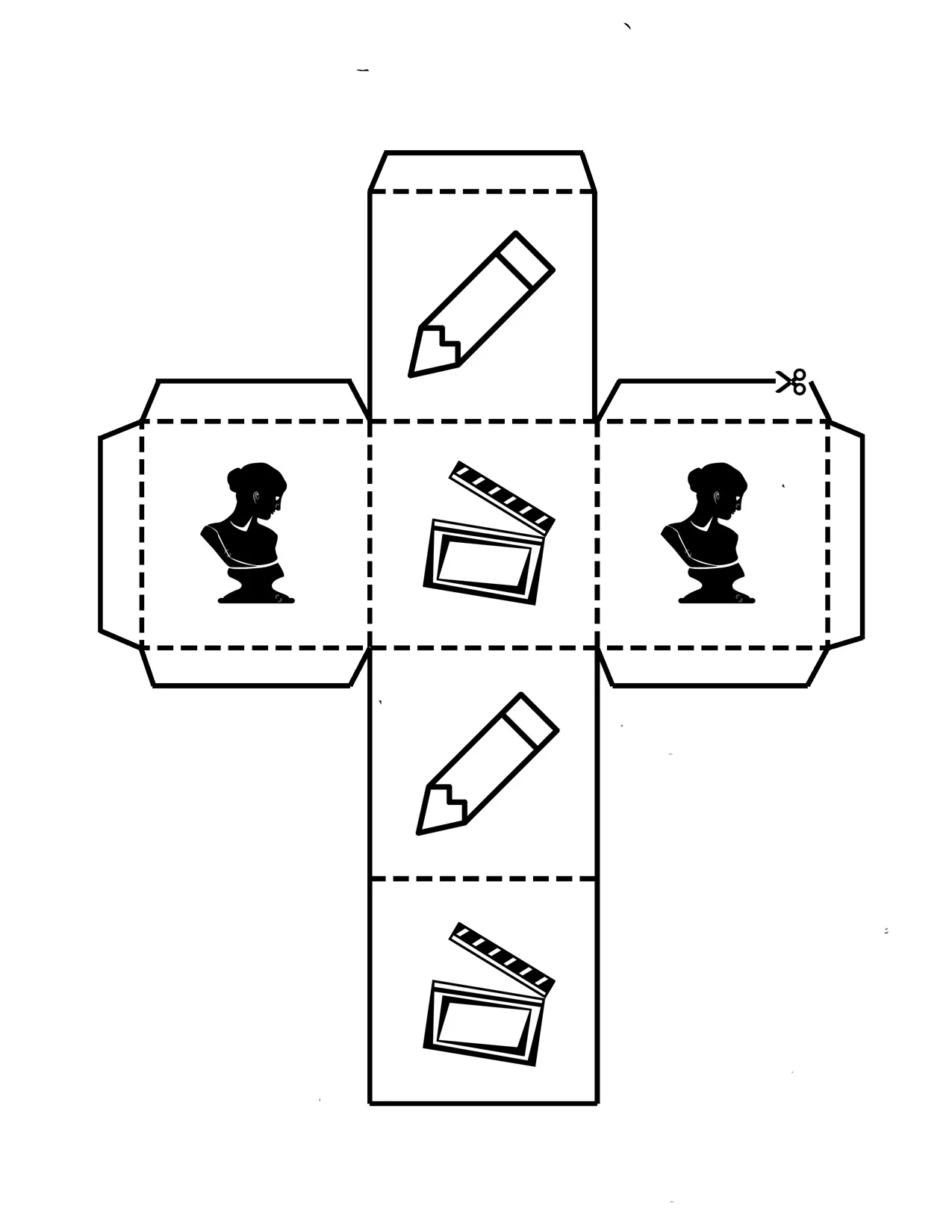
Each side of the die has an image representing the way the student will try to get their group to guess the rule—pencil means they draw, the bust means they sculpt and the clapperboard indicates they will in turn act out the clue. They roll the die, grab a clue card and then turn the timer for 30 seconds. (We used sand timers but you could monitor the time in many ways!)
This is always one of my favorite activities every year because it is a perfect way to match content with collaboration. Now in this lesson we used the dice to review school/class rules but the beauty of the Cranium-style actions is that they could be used with any content. Have lab procedures to review in science—do it in an #interACTIVE style! Maybe you want students to review the week list of vocabulary words—try it in this #interACTIVE way!
But maybe you don’t want to review something as route and routine as vocabulary words or class rules. We have also included a blank template for you to take and edit for your own #interACTIVEclass! Maybe you put literature group questions on each side, or math equations for students to solve. A simple edited die could create a fun vocabulary center as well. Roll to find the part of speech, a synonym/antonym or draw an illustration representing the word. The possibilities are endless!

If you have wound up in a position where you are solely teaching students virtually, no worries! Try using a live dice video to create the same experience for students. Direct students to the video or embed directly into your LMS, and have them pause and unpause as needed to “roll” their way through any planned activity. The example below is just one of many free resources available.
As the new school year rolls out, just remember that #interACTIVE lessons don’t always have to take a long time to plan or use lots of external resources. Simple and sweet is often the best way to get students engaging with content while collaborating and creating with each other.
-K 👗
For more interACTIVE ideas on making teaching and learning more relevant and engaging, check out our book The InterACTIVE Class!


Immersive Reader in a Primary Classroom (Pt. #1)
Every once in a while, an #EdTech tool comes around that really ups the ante. In most cases, these tools are easily identified with certain grade levels, and then it’s up to the teacher’s creativity to find ways to implement it.
Every once in a while, an #EdTech tool comes around that really ups the ante. In most cases, these tools are easily identified with certain grade levels, and then it’s up to the teacher’s creativity to find ways to implement it.
Microsoft’s newest addition to the Office 365 suite is a complete changer. You can find it throughout the suite, but for today’s purpose, I’ll be sharing how my first graders used it with Word Online.
Let’s face it…reading and understanding a first grade writing piece often involves the use of a decodable pen, turning the paper around all sides, and the use of a translator. How teachers are able to understand any of this is truly a work of art. But, what if we were able to provide an opportunity for our students to hear back what they wrote before they handed it to us? What if they could hear their own mistakes, and go back to edit their work until it was correct - and THEN submit it to us? If you’re like me, you are shaking your head, “YES!”
For our last writing assignment, I had my students take their rough drafts and type them directly into Word Online. I didn’t ask them to show me ahead of time - in fact, I wanted them them to make mistakes. The reason why, was because immediately after they finished typing, I had them open Immersive Reader which allows them to hear back what they wrote.
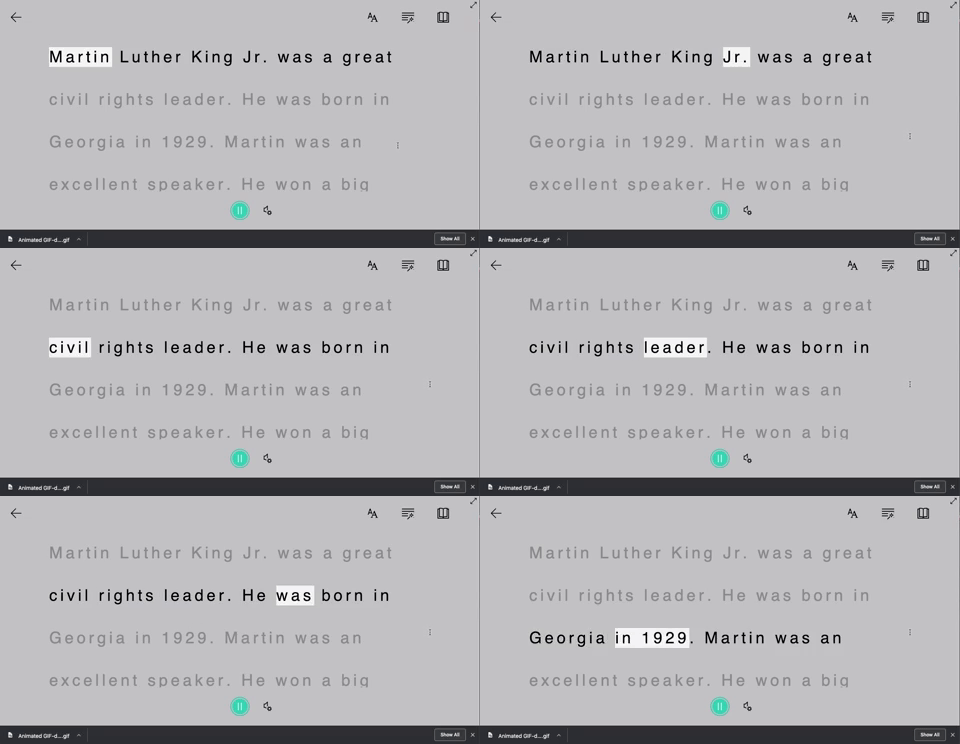
If they had mistakes, they were able to go back, edit them, and then correct them - all without my help! But wait…it get’s better…
At this point in our year, I am teaching the students the importance of checking their parts of speech. With a few simple clicks, they can have Immersive Reader check that, too.

But what if you have a student who just needs some help pronouncing some words? Immersive Reader can even break apart syllables!

Stay tuned to see how we transformed an ordinary rubric to make it more #interACTIVE! 👓 -J
📺 Flipgrid TV! 📺
Flipgrid TV is an activity that I came up with where students work through four tasks throughout the course of one week. My students were responsible for completing all of the tasks before the end of the week, but it was their responsibility to complete one per day. They were able to pick whichever activity they wanted, but again - all had to be completed prior to the end of the week.
📺 Flipgrid TV! 📺
Flipgrid TV is an activity that I came up with where students work through four tasks throughout the course of one week. My students were responsible for completing all of the tasks before the end of the week, but it was their responsibility to complete one per day. They were able to pick whichever activity they wanted, but again - all had to be completed prior to the end of the week.
So, how do you do it? It’s actually quite simple. Here’s what you’ll need to create your own version:
Step #1: Record your tasks
Record yourself explaining the task(s)
You can create as many videos / tasks as you’d like. They will eventually be “app smashed” into Do Ink, so don’t spend too much time worry about how they look. Just be sure to explain clearly, and set the expectations.
Step #2: Find a green screen TV
Pick out your favorite from a quick Google search
Search for a “green screen tv” on Google. Pick one out that you like, and save it to your device’s camera roll.
Step #3: Uploading your TV
Open Do Ink and insert your green screen TV
Open up Do Ink on your device. Then, click the plus sign on the top layer. Tap on “insert image.”
Step #4: Uploading your video / tasks
App smash your video / tasks into Do Ink
On the second layer, tap the plus sign and select “video.” Find your recorded video / task and upload it. You may need to resize it to fit into your green screen TV.
Step #5: Export the file
Save your new Do Ink video onto your camera roll
Tap the back button to return to the main screen. Then, tap the “sharrow” and select “export. The file will then be saved to the camera roll.
Step #6: Upload to Flipgrid (IMPORTANT!)
Upload the new Do Ink video to Flipgrid
With your new Do Ink video ready, start a new Flipgrid topic. IMPORTANT: Post your video(s) as if you are a student. Then you can have as many different questions / tasks that you’d like. When the students go to complete the tasks, explain to them that they are to only respond to you. They should NOT be creating a new response. This will keep everything organized under the appropriate topic. See the GIF above for a better understanding!
Step #7: Repeat as needed
Repeat the steps above for all the tasks you’d like to assign.
Just repeat those steps for each task. Make sure that when you go to post onto Flipgrid, you post as a student. Remind your students to reply to you - and not each other!
